
AI MCP Server for SAP
Ask SAP in plain language, from the AI tool you already use.
The basis.no MCP server connects your preferred language model to SAP through OData services: SAP's standard services and your own. Users ask questions such as "which maintenance orders on this station are still open?" and get answers from live SAP data, with their own SAP authorisations applied. Only one OData service is installed in SAP, there is no new application for users, and it works on ECC as well as S/4HANA. From €500 per month.
- 24/7/365 on call
- Standard and custom OData services
- Your choice of language model
Is this for you?
- 01
Your users want answers from SAP without learning SAP transactions.
- 02
You want AI tools to reach approved SAP data only, with every call logged.
- 03
You want to start with a bounded pilot in your own landscape.
The answer is in SAP. Getting to it is the problem.
Most questions people have about SAP data are simple. Answering them is not. It takes the right transaction, the right selection screen, an export to Excel and someone who knows where the field is stored.
- A maintenance planner wants every earlier notification on the same pump with a similar fault text.
- A buyer wants to know which purchase orders for critical materials are late, and from which suppliers.
- A customer service agent needs order status, delivery date and billing history while the customer is on the phone.
- A controller wants the variance between two periods explained by company code and G/L account.
AI assistants are good at understanding these questions, but they cannot see your SAP system. The basis.no MCP server gives them that access, in a controlled way, through the APIs SAP already provides.
How it works
MCP (Model Context Protocol) is an open standard for connecting AI assistants to external systems. An MCP server describes a set of tools the AI can call. Ours turns SAP OData services into those tools.
Two connections, both set up in the dashboard:
API_MAINTENANCEORDER or API_SALES_ORDER_SRV, and your own custom OData services, which work automatically. Services only need to be activated in the gateway. One OData service from basis.no is installed in SAP, so the server knows the user's language and default values.What a conversation looks like:
Example for illustration. The LLM can only use the services and entities you have opened in the dashboard.
What you get, at a glance
Built to give results quickly, on the SAP system you run today, in the tools your users already work in.
| Area | basis.no AI MCP Server for SAP | What it means for you |
|---|---|---|
| SAP releases | SAP ECC and S/4HANA, on-premise, hosted or RISE. Anything with OData services | No need to wait for an S/4HANA migration or a cloud contract to start using AI |
| Time to first use | Days. Connect the MCP server, install the user details service, activate OData services, add users | A pilot with real users and real data within weeks, not a long project |
| Changes in SAP | One OData service from basis.no, for user details. Otherwise SAP's standard OData APIs and your own | Only the user details service is installed in your SAP system |
| Where users work | basis chat, or their own chat tool: Claude, ChatGPT, Copilot Studio and other MCP clients | No new application to roll out or train people on |
| Language model | Your choice, on your own account: OpenAI, Azure OpenAI, Anthropic Claude, SAP AI Core, Google Gemini, Mistral | Use the model that fits your agreements and budget, and switch when better models arrive |
| Other systems | Other OData sources, and other MCP servers in the same chat, such as Microsoft 365, CRM or ticketing | One place to ask questions that span SAP and the rest of your business |
| What the AI can access | You choose service by service and entity by entity: read, create, update, delete | Full control of what the AI can see and do, with SAP authorisations applied per user |
| Pricing | From €500 per month for 10 users, 10 APIs, 1 SAP system. LLM usage paid directly to your LLM provider | A predictable monthly cost, and full visibility of what you spend on the language model |
Use your preferred interface, or ours
You do not need a new application for this. Because the server follows the MCP standard, it works in any chat tool that supports MCP.
basis chat is a good place to start a pilot. You can move users to another interface later without changing anything on the SAP side.
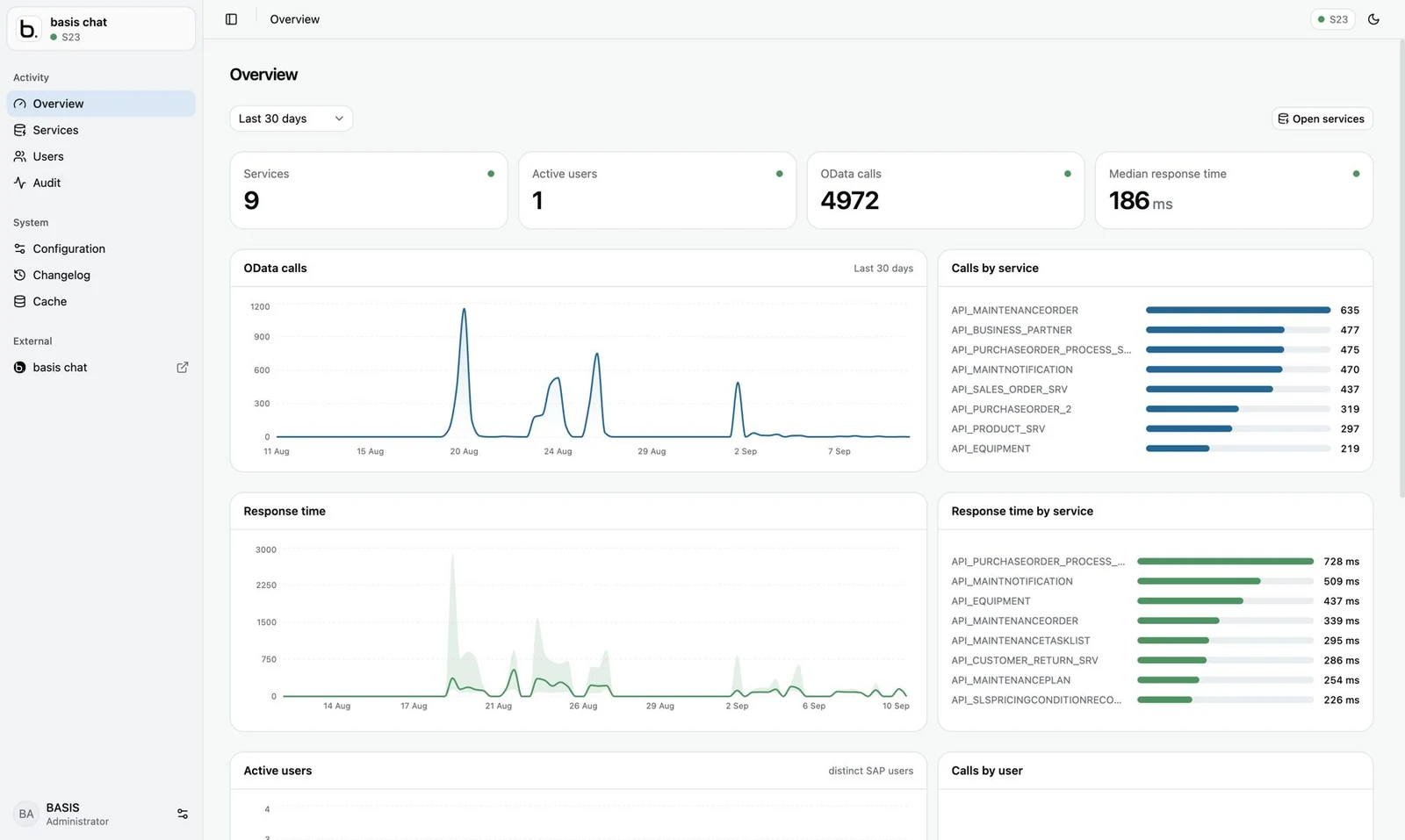
One dashboard to set up, control and follow usage
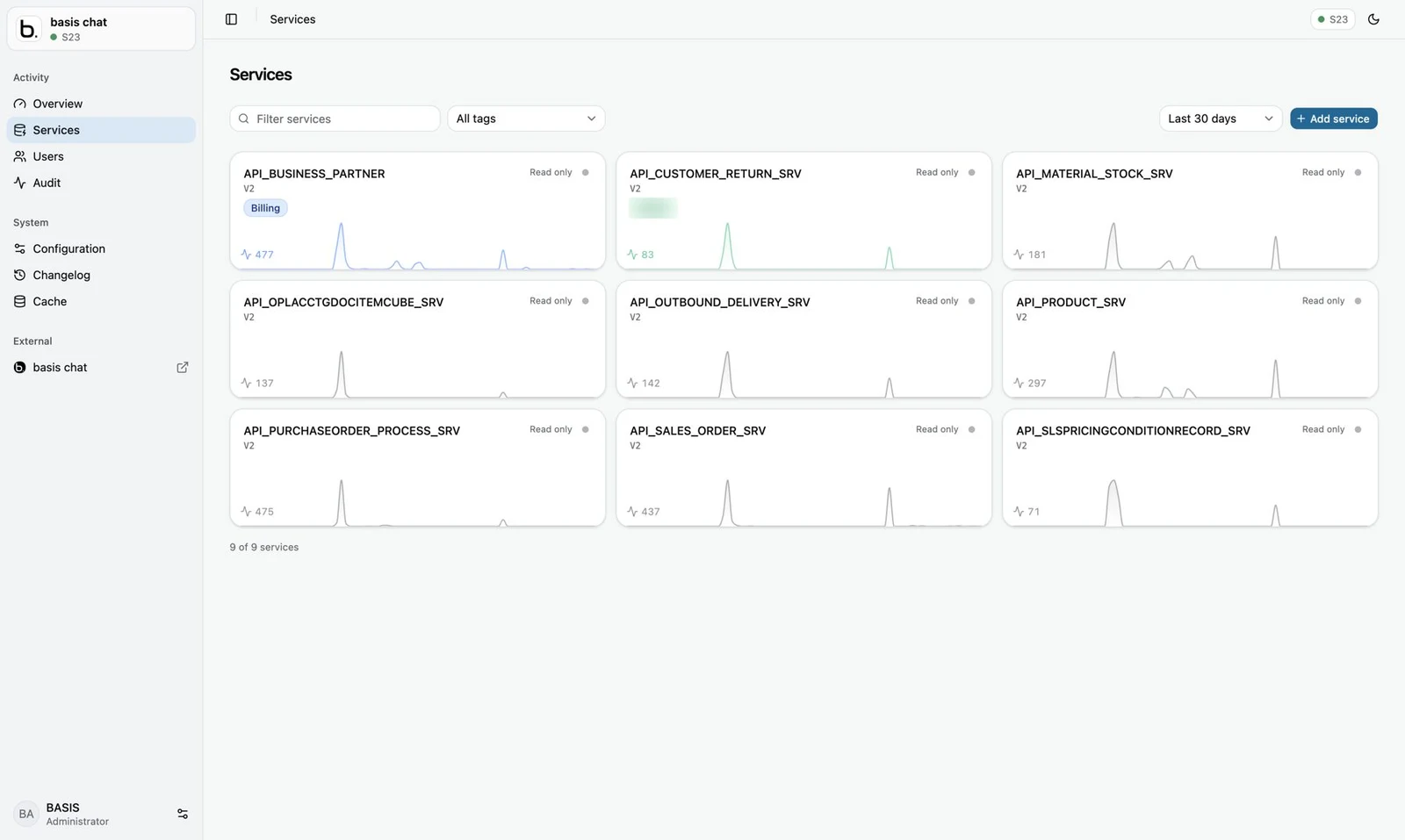
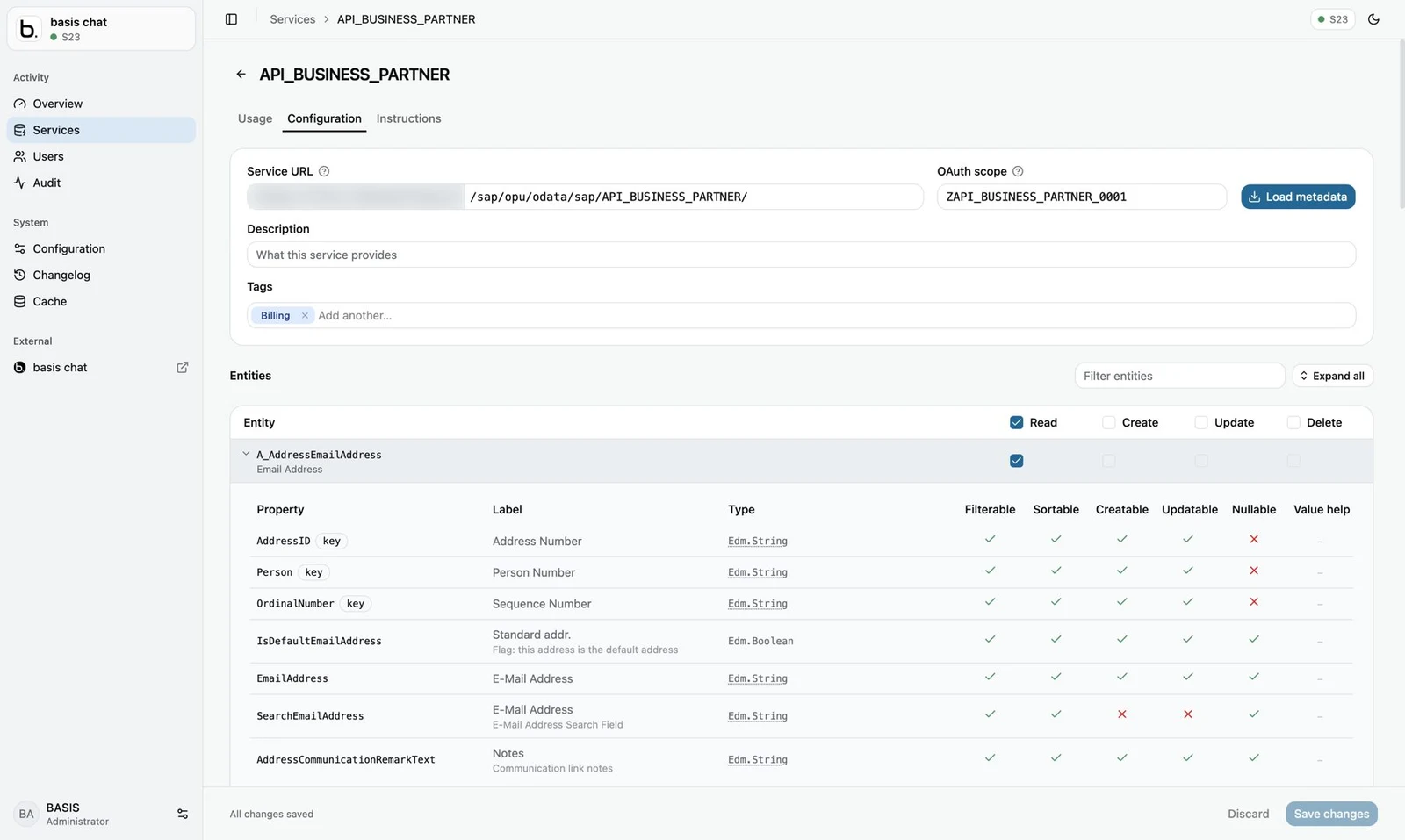
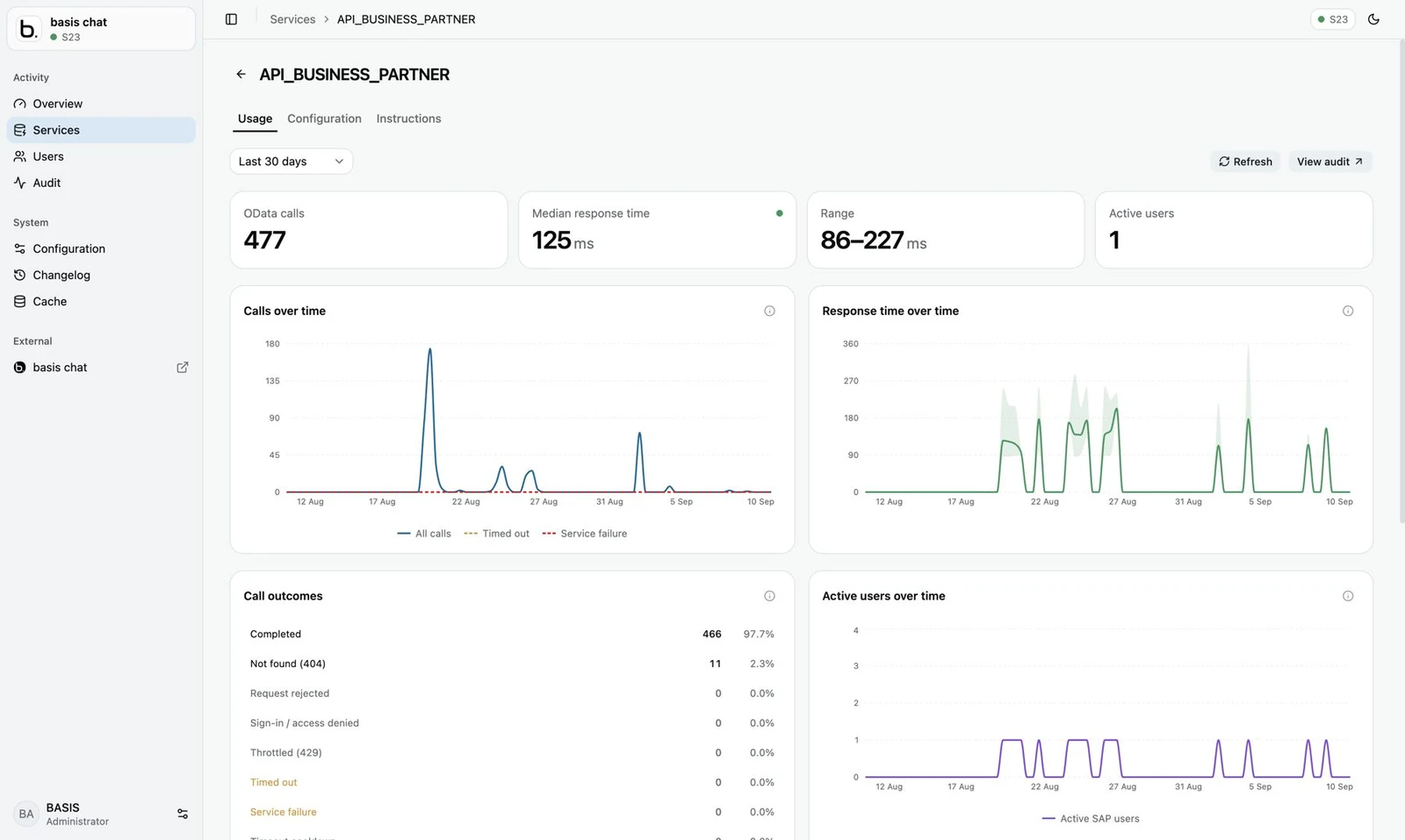
Everything is managed from a web dashboard: the LLM connection, users, which OData services the AI can use, and how they perform. No coding is needed to add a new SAP service.
- LLM connection – enter the API URL and API key for your language model.
- Users – add users, map them to their SAP users and see who is active.
- Services – add OData services, load metadata and set access per entity.
- Usage and performance – calls, response times and errors, per service and per user.
- Audit – a log of every call made to SAP, by whom and when.
Your SAP authorisations still decide
The AI does not get a super-user in SAP. Every call is made as the user who asked, so a user can never see more through the chat than they can see in SAP today.
- Identity-aware access – each user is mapped to their own SAP user. SAP roles and authorisation objects apply as normal.
- Sign-in – OAuth 2.0 against SAP, with single sign-on through SAML 2.0 and Microsoft Entra ID.
- Read and write separated – read access by default. Create, update and delete are switched on per entity, only where you choose.
- Data minimisation – only the services and entities you open are visible to the LLM, and only the fields needed for the question are fetched.
- Full audit trail – every OData call is logged with user, service, time and outcome.
- Hosted by basis.no – the MCP server, dashboard and basis chat run in basis.no's data centres in Norway or Germany. basis.no is ISO 27001 certified.
The language model runs with the provider you choose, on your account and under your agreement with them. You can set a spending limit with the provider.
What customers use it for
Any area with SAP OData services, standard or your own, can be opened to the AI. These are common starting points.
From first conversation to daily use
We recommend starting small: a read-only pilot with a handful of users and the OData services that matter most to them.
- Pick the questionsTogether we choose 5–10 business scenarios and the SAP OData services that answer them.
- ConnectWe set up your MCP server and connect it to your SAP system, where our OData service for user details is installed. You activate the OData services in the SAP gateway if they are not already active.
- Choose your LLMEnter the API URL and key for your preferred model in the dashboard.
- Add usersEnrol the pilot users and map them to their SAP users.
- Pilot, read-onlyUsers work with real data for a few weeks. We follow usage and response times in the dashboard and tune service instructions.
- ExpandAdd more users, services and, where it makes sense, controlled write actions.
Price and quote
Need more users, services or SAP systems? Fill in the form and we send you a price by e-mail.
LLM usage is not included. You use your own account with the model provider and pay them directly for tokens used. Costs depend on how much the system is used, and most providers let you set a monthly limit.
Common questions
What is MCP?
Model Context Protocol is an open standard, introduced by Anthropic in 2024 and now supported by OpenAI, Microsoft, Google and others. It defines how an AI assistant discovers and calls tools in external systems. Because it is a standard, one MCP server works with many different chat tools and models.
Do we need to install anything in SAP?
One OData service from basis.no. It gives the server the user's username, name, preferred language and user parameters, such as default plant or sales organisation. The server uses these to query SAP with the same default filters as SAP GUI, and to answer in the user's language. Beyond that, the services you want to use must be active in the SAP gateway, and users need the normal SAP authorisations for the data. Your own custom OData services work automatically, in the same way as SAP's standard services.
Does it work with SAP ECC?
Yes, as long as the system has a gateway with OData services. It works the same way for ECC, S/4HANA on-premise, hosted S/4HANA and RISE.
Which language models can we use?
OpenAI, Azure OpenAI, Anthropic Claude, SAP AI Core, Google Gemini and Mistral. You use your own account and enter the API URL and key in the dashboard. You can change model later without changing the SAP setup.
Can the AI change data in SAP?
Only if you allow it. Every service starts as read-only. Create, update and delete are switched on per entity in the dashboard, and changes are made as the signed-in user, with their SAP authorisations and a full audit log.
Is our SAP data used to train the language model?
That is governed by your agreement with the LLM provider. The business and enterprise API offerings from the major providers do not use API data for training by default. Check the terms for the provider you choose, or ask us and we will help.
Is the answer always correct?
The data comes straight from SAP, but the LLM interprets the question and writes the answer. That is why each answer is based on visible OData calls, and why we recommend a read-only pilot first. Service instructions in the dashboard help the model use each service correctly.
Can we use it with systems other than SAP?
Yes. The server can connect to other OData sources, and because it follows the MCP standard, your chat tool can use it together with other MCP servers, for example for Microsoft 365, CRM or ticketing systems.

Let's find the first questions to answer.
Tell us which SAP system you run and where your users lose the most time looking for information. We suggest a scope for a pilot and a fixed monthly price.